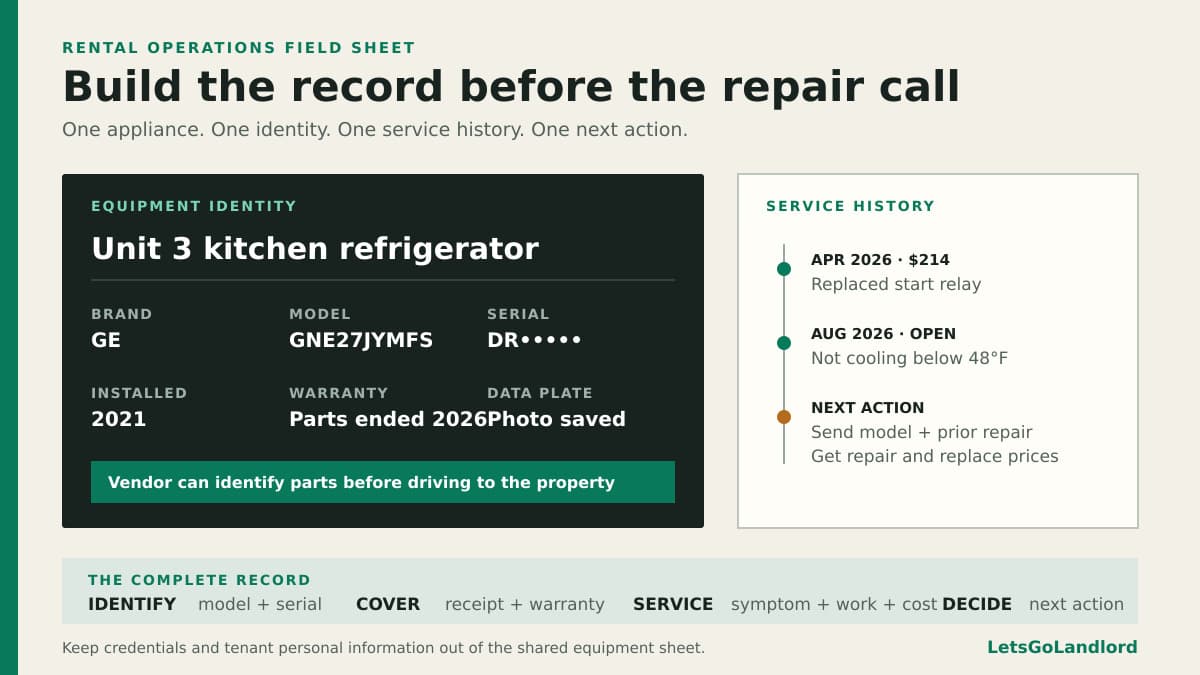
A tenant reports that the refrigerator has stopped cooling. The first vendor question is predictable: "What is the model number?" If the answer requires a trip to the property, the repair has already lost time.
An appliance inventory should do more than prove that a refrigerator exists. It should give you the facts needed to order a part, check warranty coverage, explain an earlier repair, or decide that another service call no longer makes sense.
Give every appliance a clear identity
Create one equipment record for every landlord-supplied refrigerator, range, dishwasher, microwave, washer, dryer, water heater, and heating or cooling system. Assign each record to the property or the specific unit where it lives. In a building with repeated models, "GE refrigerator" is not enough. Use a location label such as "Unit 3 kitchen refrigerator" so nobody updates the wrong record.
Record the brand, full model and serial number, approximate installation date, and any other identifier printed on the data plate. Photograph the plate straight on, then check that every character is readable before leaving. Zero, O, one, and I are easy to confuse in a dim cabinet or behind a laundry machine.
Add the appliance's physical details when they affect parts or replacement. Useful examples include width, fuel type, voltage, venting arrangement, door swing, water-heater capacity, and HVAC filter size. Record only what you can verify. A guessed measurement can send the wrong appliance or part to the property.
Save the purchase and warranty facts while they are easy to find
Attach or link the receipt, installation invoice, warranty terms, and installer contact. Write down the purchase date, warranty end date, and what the warranty excludes. A manufacturer's parts warranty may not cover labor, travel, removal, or damage caused by installation. Keep those distinctions visible instead of writing only "under warranty."
If registration is required, record when it was completed and which name or business holds it. Do not store account passwords, payment details, or unrelated personal information in a shared appliance sheet. The working record needs dates, documents, contacts, and coverage terms. Credentials belong in an approved password manager.
When an appliance transfers with a property purchase, label any missing facts as unknown. An honest blank invites someone to fill it during the next visit. An invented install year quietly becomes a bad replacement forecast.
Turn each service call into history
After a repair, add the complaint, diagnosis, work performed, parts used, vendor, completion date, cost, and warranty on the repair itself. Keep the vendor's wording when it matters. "Replaced start relay" will help the next technician more than "fixed refrigerator."
Link the repair to the same equipment record instead of leaving it inside a text thread. Repeated calls then become visible. Three visits for the same symptom tell a different story from three unrelated repairs spread across several years.
Close the service entry with a result. Note whether the appliance returned to normal operation, needs a follow-up check, is operating with a known limitation, or was replaced. If a new unit goes in, retire the old record and create a fresh one. Overwriting the old model and serial number erases the history behind the replacement decision.
Use the record before dispatching a vendor
When a problem arrives, confirm the affected unit and appliance before troubleshooting. Pull the identity photo, model number, warranty status, previous symptoms, and recent repairs. Send the vendor the tenant's current description and the verified equipment facts. Do not diagnose a gas, electrical, refrigerant, or combustion problem beyond your competence.
In LetsGoLandlord, a vendor record keeps the vendor's trade, company, phone, and email together, so the right person is easy to find when an appliance issue arrives. Pairing that record with the equipment facts gives you a cleaner handoff than searching old texts while the tenant waits.
Ask whether the vendor needs a data-plate photo, error code, filter size, or access measurement before the visit. Better information can prevent a second trip, but it should not turn the tenant into a repair technician. If there is smoke, fire, a suspected gas leak, active flooding, electrical arcing, or another immediate danger, handle the safety response first.
Keep access details separate from appliance facts. The vendor may need an appointment window, tenant contact instructions, parking notes, or permission limits for occupied-unit entry. Follow the lease and local requirements for notice and access. This article provides general operating information, not legal or safety advice.
Set a replacement trigger before the next failure
Age alone does not decide whether to repair or replace. Review the current repair estimate, prior repair cost, parts availability, downtime, condition, energy or water use, warranty coverage, installation work, and the cost of a suitable replacement. Write down the reason for the choice so the next decision does not begin from memory.
Define the next action on the record. That might be ordering a common filter, checking a repair after 30 days, measuring the opening before replacement, getting another estimate, or budgeting for a likely failure. A register with no next action becomes an archive. A small action field turns it into an operating tool.
For a replacement large enough to change the property's cash flow, update the property's operating assumptions with the new cost and expected operating change. The record will not predict the appliance's remaining life, but it will make the financial impact visible.
Keep the register beside the property record
A spreadsheet can work if every appliance has one stable row and documents live at durable links. Use consistent labels, protect sensitive fields, and avoid creating a separate file for every repair. The register should remain easy to update from a phone while you are standing in front of the data plate.
Keep the register beside the property record so it is available during an inspection, work order, or repair call. Keep serial numbers and warranty details with the equipment record until your workflow needs more dedicated fields.
Start with the appliances most likely to create an urgent call. Capture the facts during a turnover, inspection, filter change, or repair visit, then keep the record current when work happens. The useful inventory is the one that answers the vendor's first question before anyone drives to the property.