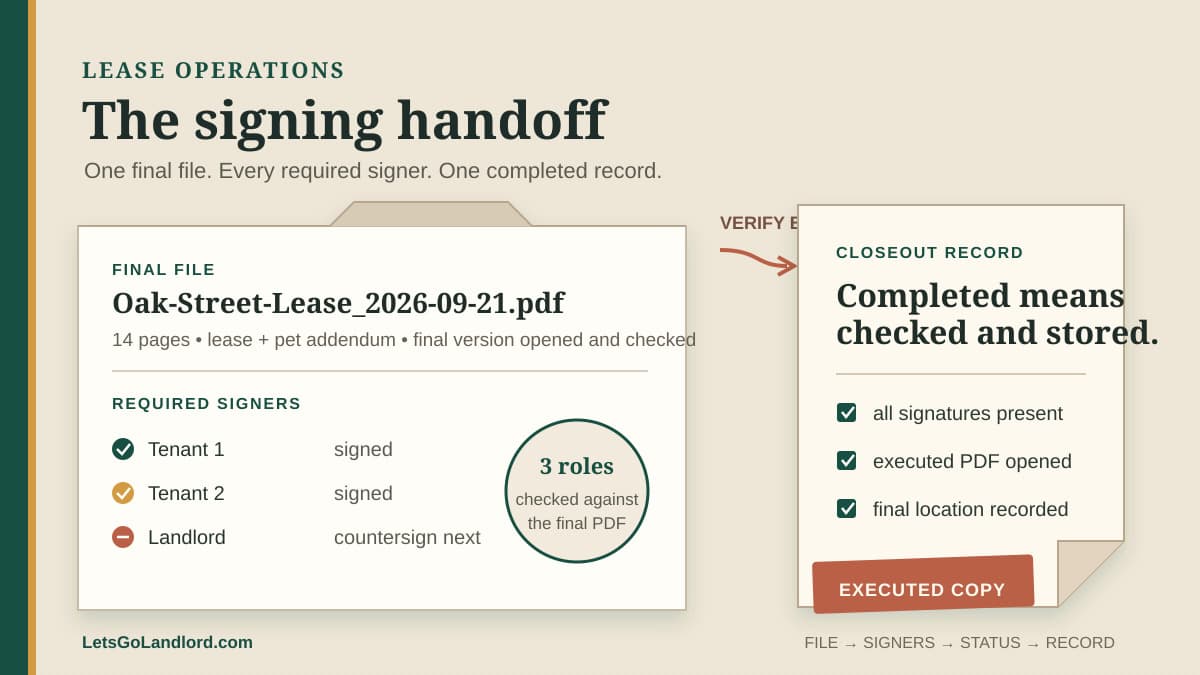
The lease is ready, so you attach a PDF and send it. A tenant signs within an hour. Then you notice the pet addendum is missing, the second adult never received a signature field, and the file name gives no clue which version went out.
The expensive part of lease signing is rarely the click on Send. It is making sure the final file reached every required signer, tracking what happened without creating duplicate versions, and putting the completed document where you can find it later. A short handoff record keeps those checks together.
Freeze one final file
Before opening the signing tool, save one final PDF with a version date in the file name. Open that saved copy and check the property and unit, landlord or ownership name, tenant names, lease term, rent, deposit, included addenda, and page count against the approved terms. Do not assume the export matches the document you just edited.
Keep draft files out of the send folder. A label such as FINAL is useful only if there is one of them. If the document changes after a request is created, stop the old request and issue a clearly named replacement rather than asking people to ignore part of an active envelope.
Use the free lease audit tool as a second reading aid when helpful, but verify the source document yourself. Extracted terms can point you to a missing or conflicting fact. They do not decide whether the lease is complete, enforceable, or suitable for the property.
List every person and their role
Write the signer list before placing fields. For each person, record the name used in the lease, email address, role, whether they must sign or only receive a copy, and whether signing order matters. Check co-tenants, guarantors, owners, managers, and any required countersigner against the actual document.
Confirm addresses through a channel you already use for the lease process. A mistyped address can delay the signing or send a private document to the wrong person. Do not put sensitive identifiers or access credentials in an ordinary handoff note.
If one person will sign for an entity or another person, pause and verify that the signature block and authority fit the transaction. A software role label cannot establish signing authority.
Place fields from the final PDF
Walk through the final PDF from the first page to the last. Assign each signature, initial, date, text, or checkbox field to the person who must complete it. Pay special attention to addenda, acknowledgments, repeated initial lines, and the landlord signature block near the end.
Use the field preview before sending. Check that fields do not cover lease text, split across pages, or fall outside the visible page. Then review the request as each signer would see it. A complete-looking field list can still be assigned to the wrong person.
Record the PDF file name, page count, signer list, and request date in the handoff. Those four facts make it much easier to tell whether a later download belongs to the request you meant to send.
Send one useful message
Tell recipients what the document is, which property it concerns, who sent it, when you need a response, and how to report a problem. Keep the note short. Do not bury a changed business term inside the delivery message when it belongs in the lease or a reviewed attachment.
Give signers time to read the document and a clear way to ask questions. Do not describe the request as complete merely because the first person signed. Keep it open until every required party has finished and any countersignature is applied.
Track the envelope, not your inbox
Use a small set of visible states: prepared, sent, viewed, partially signed, completed, expired, withdrawn, or replaced. Check the envelope record before sending a reminder. A person may have completed the request even if their email reply never reached you.
LetsGoLandlord lets you send your own PDF, tracks each signer's status, supports reminders and withdrawal, and provides the completed PDF for download. Use the envelope record as the status source, then keep tenant questions and any decision to replace the request with the lease file.
When a correction is necessary, withdraw or void the old request when the tool permits it, write down why it was replaced, and send the corrected PDF as a new envelope. Preserve the earlier event instead of renaming the replacement to look like the first request never existed.
Close with the completed document
After the envelope reports completion, download the executed PDF and any available completion or audit record. Open the PDF. Check the property, version, page count, signer names, required signatures, initials, dates, and countersignature. A Completed badge is a prompt to inspect the result, not a substitute for that inspection.
Store the executed copy with the lease record using a stable file name. Record the completion date and where the final file lives. Give each party the completed copy through the approved delivery method, and keep any access restrictions appropriate to the personal information in the document.
This article provides general operating information, not legal advice. Electronic signature consent, required disclosures, signing authority, delivery, retention, notarization, and enforceability depend on the document, transaction, and current federal, state, and local requirements. Use qualified local counsel when the rule or transaction calls for it.
Run a two-minute closeout test
Hand the record to someone with appropriate access and ask four questions: Which PDF was sent? Who had to sign? What is the current status? Where is the completed copy? If the answers require searching through email threads or comparing several FINAL files, the handoff is not closed.
The record can stay compact: final file name and page count, signer list and roles, envelope status, replacement note if needed, completed file location, and completion date. The signed lease remains the source. The handoff shows how that source moved from approved draft to completed record.