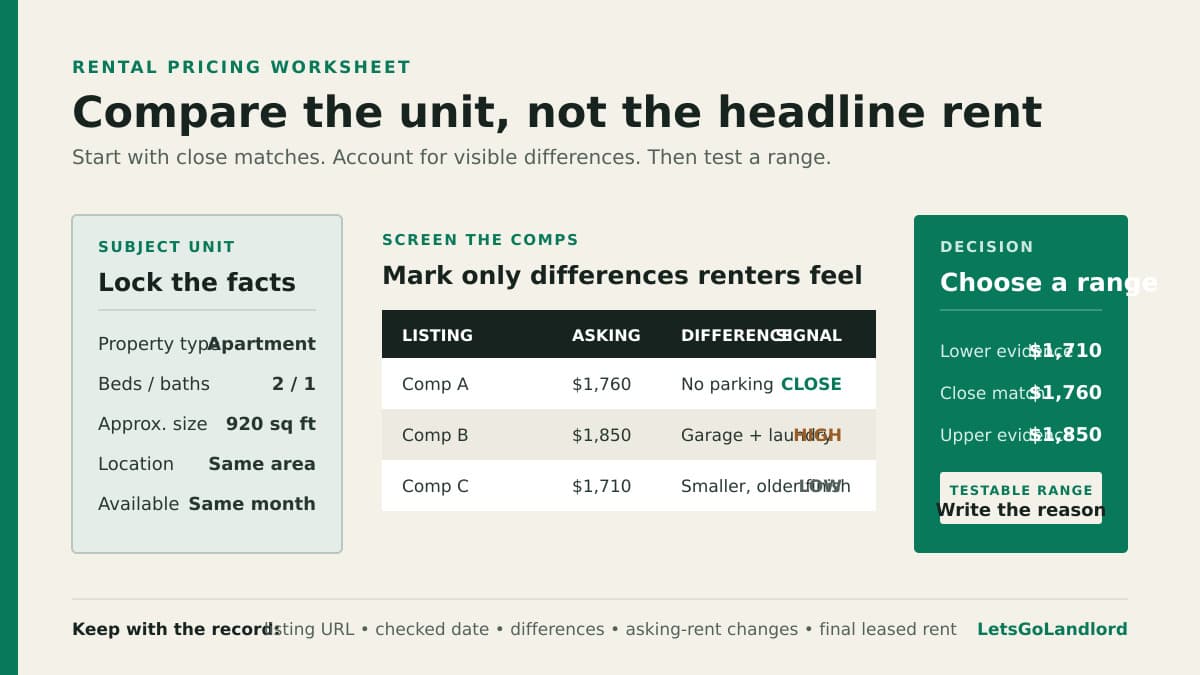
A nearby two-bedroom is listed for $1,850. That number looks useful until you notice it has a garage, in-unit laundry, and a renovation your vacant unit does not. Copying the headline rent would be easy. Comparing the two rentals properly takes a little more work.
A good comp set does not produce a perfect rent. It gives you a defensible range and a record of how you chose it. The market then answers through qualified inquiries, showings, applications, and the rent at which the unit actually leases.
Write down the subject unit before searching
Start with the facts that cannot be adjusted away: property type, neighborhood, bedroom and bathroom count, approximate square footage, floor, accessibility, parking, outdoor space, laundry, utilities included, pet terms, condition, and available date. Use the same fields for every listing you collect.
Be precise about location. A listing on the other side of a highway, school boundary, transit gap, or commercial strip may attract a different renter even when the map distance looks small. Begin close to the property and widen the search only when the first area does not produce enough genuinely similar units.
Keep the comp set comparable
Favor nearby comparable listings with the same property type and bedroom count. Then compare size, condition, major amenities, utility responsibility, and availability. A renovated apartment, a detached house, and an accessory dwelling unit should not sit in one undifferentiated average just because each has two bedrooms.
Record the listing date and current status. An active asking rent shows what another landlord hopes to get, not what a renter agreed to pay. Listings that sit for weeks, disappear, or return at a lower price tell a different story from listings that leave the market quickly. Save the URL and the date you checked it so you can revisit the evidence.
Adjust with reasons, not false precision
Mark each meaningful difference as favorable, neutral, or unfavorable compared with your unit. Focus on differences a renter can see or must pay for: parking, laundry, utilities, air conditioning, private outdoor space, recent condition, and furnished status. Skip tiny adjustments that only make the worksheet look scientific.
Do not assign a made-up dollar value to every feature. If three close comps with parking cluster above two otherwise similar units without parking, that pattern is useful. If one luxury listing is the only evidence for a feature, treat it as a weak signal rather than a pricing rule.
Choose a range and a review point
After removing obvious mismatches, look at the lower, middle, and upper end of the remaining asking rents. Place your unit within that band based on its differences and your vacancy timing. Write down both the range and the reason for the initial asking rent.
Decide in advance when you will review the price. Use a fixed period or a meaningful amount of qualified activity rather than changing rent after one quiet afternoon. At the review, separate price from presentation. Weak photos, missing details, restrictive showing times, and slow replies can suppress inquiries even when the rent is reasonable.
Read the response without chasing every signal
Track qualified inquiries, scheduled showings, completed showings, applications, common objections, and asking-rent changes. Raw message count can be misleading. A flood of questions from people who did not read the listing is not the same as steady interest from renters who meet the stated criteria.
If qualified renters view the unit but consistently choose similar alternatives, revisit the total offer: rent, deposits, utility costs, condition, and availability. If the listing gets little qualified attention, check its reach and clarity before assuming price is the only problem. Make one deliberate change at a time so the next round of activity teaches you something.
Keep the evidence for the next vacancy
Save the subject-unit facts, comp URLs, check dates, adjustments, asking-rent history, days vacant, and final leased rent. The next vacancy then starts with a real local record rather than somebody's memory of what the market was doing.
LetsGoLandlord's Rent Radar automatically pulls rental comps near your property and compares a unit's current rent with an automated market estimate. The report includes the estimate range, a map of comps, a HUD Fair Market Rent benchmark, and a downloadable PDF. Use it as an informational starting point alongside your own review, not as an appraisal or a promise that a particular asking rent will lease. The comparison page shows how that workflow differs from spreadsheets and other landlord software, while the pricing page lists the current plan options.